How to Use Claude AI for Lead Generation
How to Use Claude AI for Lead Generation (Free Method)
🤖 What Is Claude AI and Why It’s a Game-Changer for Lead Generation
Finding new customers is one of the biggest challenges for any business. You spend hours searching for leads, writing emails, and following up — only to get a handful of responses. It feels like a never-ending grind.
But what if an AI could do most of that work for you?
That is exactly what Claude AI does. Claude is an advanced AI assistant made by Anthropic. It is one of the most powerful AI tools available in 2026. And the best part? You can start using it completely free.
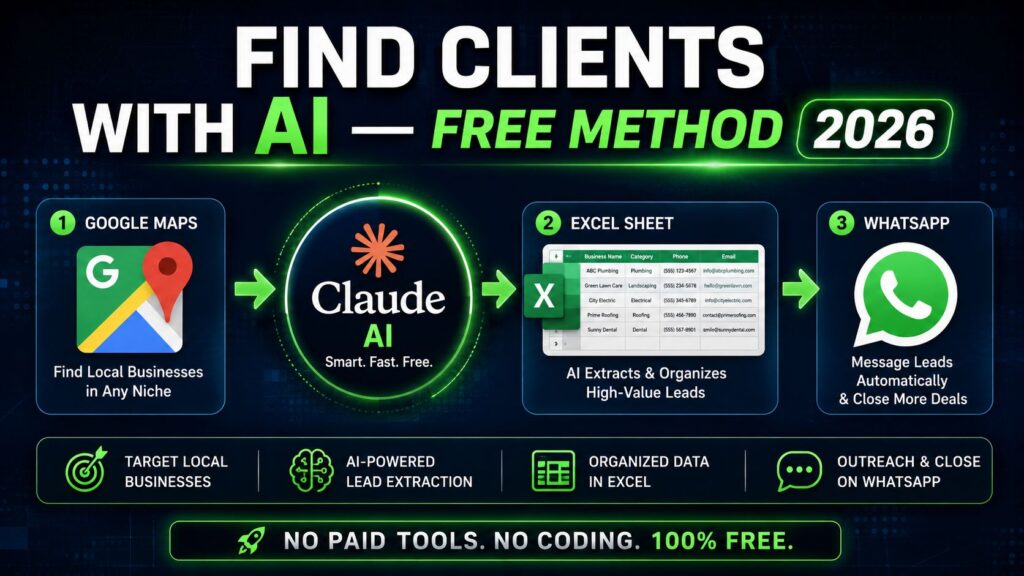
In this guide, you will learn how to use Claude AI for lead generation step by step. You will discover how to find leads from Google Maps, build a proper client list in Excel, and send outreach messages on WhatsApp — all using AI.
Whether you are a freelancer, small business owner, or digital marketer, this method works for you. No coding skills required. No expensive tools needed.
Let us get started. 🚀
🔍 What Is Lead Generation and Why Does It Matter
Before we dive into Claude AI, let us quickly understand what lead generation means.
A lead is simply a potential customer. Someone who might be interested in your product or service. Lead generation is the process of finding these people and starting a conversation with them.
Traditional lead generation takes a lot of time. You have to:
Search for businesses manually. Collect their contact information one by one. Write personalized messages for each person. Follow up multiple times without getting ignored.
This whole process can take days or even weeks. And most of the time, the results are disappointing.
AI lead generation changes everything. Instead of doing all this manually, you use AI tools to speed up the process. Claude AI can help you find leads, write outreach messages, build client lists, and even qualify prospects — all in a fraction of the time.
That is why more and more businesses are switching to AI-powered lead generation in 2026.
💡 Why Claude AI Is Perfect for Lead Generation
There are many AI tools out there. So why use Claude AI specifically for lead generation?
Here are the top reasons:
It understands context really well. Claude AI does not just give generic answers. It understands what you are asking and gives detailed, relevant responses. This is very important when you are writing personalized outreach messages.
It is available for free. Claude has a free plan that gives you access to powerful AI features. For solo operators and small teams, the free plan is a solid starting point for lead generation work.
It writes like a human. Claude AI produces natural, conversational text. Your outreach messages will not sound robotic or spammy. They will feel personal and genuine.
It handles multiple tasks. Claude can research businesses, write cold messages, create email templates, build scripts, and much more. It is like having a full sales assistant in your pocket.
It works with other tools. You can combine Claude with Google Maps, Excel, WhatsApp, and automation tools to build a complete lead generation system.
Now let us look at how to actually use Claude AI for lead generation step by step.
🗺️ Step 1 — Find Leads Using Google Maps
Google Maps is one of the most underrated lead generation tools in the world. It contains millions of business listings with names, phone numbers, addresses, websites, and reviews — all publicly available.
Here is how to use Google Maps to find leads for free.
Open Google Maps
Go to maps.google.com on your browser. You do not need to log in. The search feature is completely free.
Search for Your Target Businesses
Think about what kind of businesses you want to target. For example:
If you offer social media marketing services, search for “restaurants in London” or “salons in Manchester.” If you offer website design services, search for “plumbers in New York” or “electricians in Chicago.” If you offer SEO services, search for “law firms in Los Angeles” or “dental clinics in Houston.”
Type your search and hit enter. Google Maps will show you a list of businesses in that area.
Collect Business Information
Click on each business listing. You will find:
Business name. Phone number. Website link. Address. Opening hours. Customer reviews.
Write down or copy this information. You will use it later to build your client list.
Pro Tip: Look for Businesses with These Signs
Not all businesses are good leads. Look for businesses that:
Have 10 to 50 reviews (they are established but not too big). Have a basic or outdated website. Have low star ratings that could be improved. Do not have a strong social media presence.
These businesses are most likely to need your services. They are your ideal leads.
Use Claude AI to Speed Up This Process
Here is where Claude AI comes in. Instead of manually analyzing each business, you can paste the business information into Claude and ask it to help you qualify the lead.
For example, open Claude.ai and type:
“Here is information about a local business: [paste business details]. Based on this, do you think they would benefit from social media marketing services? Why or why not?”
Claude will analyze the information and give you a detailed answer. This saves you time and helps you focus only on the best leads.
📊 Step 2 — Build a Client List in Excel Using Claude AI
Once you have collected lead information from Google Maps, the next step is to organize it into a proper client list. This is where Excel comes in.
A well-organized client list is the backbone of any lead generation campaign. It helps you track leads, follow up at the right time, and measure your results.
Create Your Excel Spreadsheet
Open Microsoft Excel or Google Sheets (both work fine). Create a spreadsheet with the following columns:
| Column | What to Enter |
|---|---|
| Business Name | Name of the company |
| Owner/Contact Name | Person to reach out to |
| Phone Number | WhatsApp or call number |
| Email Address | Business email if available |
| Website | Their website URL |
| Location | City and area |
| Business Type | Restaurant, salon, plumber, etc. |
| Lead Score | Hot, Warm, or Cold |
| Notes | Any special observations |
| Status | Not Contacted, Contacted, Replied, Closed |
Use Claude AI to Organize Your Data
Here is a powerful trick. If you have collected a lot of business information in a messy format, Claude AI can help you organize it quickly.
Copy all your raw data and paste it into Claude. Then ask:
“I have collected the following business information from Google Maps. Please organize this into a clean table with columns for: Business Name, Phone Number, Website, and Location.”
Claude will instantly organize all the messy data into a clean, structured format that you can copy directly into your Excel sheet.
This trick alone saves hours of manual data entry work.
Score Your Leads
Not all leads are equal. Some businesses are more likely to buy from you than others. This is called lead scoring.
Use Claude AI to help you score your leads. Paste the business information and ask:
“Based on this information, rate this lead as Hot, Warm, or Cold for my social media marketing services. Explain your reasoning.”
Claude will give you a score and explain why. Focus your energy on Hot and Warm leads first. Do not waste time on Cold leads in the beginning.
Keep Your List Updated
Your client list is a living document. Update it regularly. Every time you contact a lead, change their status. When someone replies, move them to the next stage. When you close a deal, mark them as a client.
This organized approach makes your lead generation process professional and scalable.
💬 Step 3 — Write Outreach Messages Using Claude AI
This is where Claude AI truly shines. Writing outreach messages is one of the hardest parts of lead generation. You want to sound friendly, professional, and persuasive — all at the same time.
Most people write generic messages that get ignored. Claude AI helps you write personalized messages that actually get responses.
What Makes a Good Outreach Message?
A great outreach message has these elements:
It mentions the specific business by name. It shows that you understand their situation. It offers clear value — what is in it for them. It has a simple call to action. It is short and easy to read.
How to Use Claude AI to Write WhatsApp Messages
Open Claude.ai and use this prompt:
“Write a friendly WhatsApp message for a local restaurant called [Business Name] in [City]. I am offering social media marketing services. The restaurant has 25 Google reviews and no Instagram presence. The message should be short, professional, and personalized. End with a soft call to action.”
Claude will generate a high-quality message for you. Here is an example of what it might produce:
“Hi there! 👋 I came across [Restaurant Name] on Google Maps and loved your menu. I noticed you do not have an Instagram page yet — that is a huge opportunity you might be missing out on! I help local restaurants attract more customers through social media. Would love to show you what we can do for [Restaurant Name]. Can we chat for 5 minutes this week?”
This message is personal, friendly, and gets straight to the point. It is much more likely to get a response than a generic “Hi, I offer marketing services” message.
Create Message Templates for Different Business Types
Different businesses need different messages. Use Claude AI to create a library of templates for:
Restaurants and cafes. Salons and beauty parlors. Plumbers and electricians. Dental clinics and doctors. Law firms and consultants. Real estate agents. Retail shops.
Ask Claude to write a template for each business type. Save these templates in a separate document. When you find a new lead, just customize the relevant template slightly and send it.
This approach lets you send dozens of personalized messages every day without spending hours writing each one from scratch.
WhatsApp Outreach Tips
Here are some important tips when sending WhatsApp messages for lead generation:
Only message businesses that have publicly listed their WhatsApp number. Always introduce yourself clearly. Do not send long messages. Keep it under 100 words. Include a clear question at the end to encourage a reply. Do not send follow-up messages too quickly. Wait at least 48 hours. Never send the same message to hundreds of people at once. WhatsApp can ban your number for spam.
🤝 Step 4 — Qualify Leads and Handle Replies with Claude AI
When someone replies to your outreach message, the real work begins. You need to qualify them — figure out if they are a good fit for your services and if they can actually afford to work with you.
This is another area where Claude AI can help.
Ask the Right Qualifying Questions
Use Claude to generate a list of qualifying questions for your specific service. For example:
“Write 5 qualifying questions I should ask a local restaurant owner who has responded to my social media marketing outreach message.”
Claude might generate questions like:
Are you currently running any social media accounts? What is your monthly budget for marketing? Are you looking to attract more local customers or grow an online presence? Have you tried any marketing services before? What is the biggest challenge you face in getting new customers?
These questions help you understand if the lead is worth pursuing before you invest more time.
Use Claude to Craft Follow-Up Messages
Not everyone replies on the first message. You need to follow up. But follow-up messages can easily come across as annoying if not written well.
Use Claude AI to write follow-up messages that are helpful rather than pushy. For example:
“Write a follow-up WhatsApp message for a local business that did not respond to my first message. I offer website design services. The follow-up should be friendly, add new value, and not sound desperate.”
Claude will craft a smart follow-up that gives the lead another reason to respond — without making them feel pressured.
Handle Objections with Claude AI
Sometimes leads will have objections. They might say:
“I cannot afford it right now.” “I am already working with someone.” “I do not think I need this.” “Can you send me more information?”
Ask Claude how to handle each objection professionally. For example:
“A potential client said ‘I already have someone managing my social media.’ How should I respond to keep the conversation going without being pushy?”
Claude will give you a confident, professional response that keeps the door open.
⚙️ Step 5 — Automate Your Lead Generation with Claude AI and Free Tools
Once your manual process is working, you can start to automate parts of it. Automation means doing more work in less time — which means more leads and more sales.
Here are some free or low-cost tools you can combine with Claude AI:
n8n (Free Automation Tool)
n8n is a free, open-source automation tool. You can use it to connect Google Maps data, Claude AI, and your outreach tools together. For example, you can set up a workflow that automatically pulls new business listings, sends the data to Claude for analysis, and adds qualified leads to your Excel sheet.
Make (Formerly Integromat)
Make is another automation platform. It has a free tier that allows basic automations. You can use it to connect Claude AI with WhatsApp Business, Gmail, or Google Sheets.
Google Sheets + Claude API
If you are slightly technical, you can connect Google Sheets to the Claude API. This lets you run Claude AI commands directly from your spreadsheet — automatically analyzing leads, scoring them, and generating outreach messages without switching between tools.
Apify
Apify is a web scraping tool that can automatically collect business data from Google Maps. Instead of manually clicking each listing, Apify can scrape hundreds of listings for you in minutes. Combine this with Claude AI to build a fully automated lead generation pipeline.
The Power of Combining Tools
Here is what a simple automated workflow looks like:
Apify scrapes business listings from Google Maps automatically. The data goes into Google Sheets. Claude AI analyzes and scores each lead. Personalized outreach messages are generated for Hot leads. Messages are sent via WhatsApp Business or email.
This kind of system can run in the background while you focus on closing deals. It is the future of lead generation.
📈 Best Practices for Claude AI Lead Generation in 2026
Now that you know the full process, here are some best practices to get the best results.
Always Personalize Your Messages
Even when using AI-generated templates, always add a personal touch. Mention the business name. Reference something specific about their business. Show that you have done your homework.
Personalized messages get 3 to 5 times more responses than generic ones. Claude AI makes personalization easy and fast.
Focus on Quality Over Quantity
It is tempting to blast messages to hundreds of businesses at once. But this approach rarely works. A focused campaign targeting 50 highly relevant businesses will outperform a generic campaign targeting 500 random ones.
Use Claude to help you identify the best quality leads. Then focus your energy there.
Track Everything in Your Excel Sheet
Always update your client list after every interaction. Note what message you sent, when you sent it, and what the response was. This data helps you improve your approach over time.
Test Different Messages
Not every message will get the same response. Test different versions with Claude AI. Try different openings, different value propositions, and different calls to action. See what works best for your target audience.
Follow Up Consistently
Most deals happen on the 3rd to 5th follow-up. Most people give up after the first message. Use Claude AI to write a series of follow-up messages — and actually send them.
Consistency is what separates successful lead generators from those who give up.
Stay Compliant
Always respect privacy laws and messaging platform rules. Only contact businesses that have publicly shared their contact information. Do not buy or scrape private data. Follow WhatsApp Business policies to avoid getting your number banned.
💰 How Much Money Can You Make with This Method?
This is the question everyone wants answered. And the honest answer is — it depends on your skills, your niche, and how consistently you apply this method.
But here are some realistic numbers:
| Service | Average Price Per Client | Clients Per Month | Monthly Income |
|---|---|---|---|
| Social Media Management | $300 – $500 | 5 clients | $1,500 – $2,500 |
| Website Design | $500 – $1,500 | 3 clients | $1,500 – $4,500 |
| SEO Services | $400 – $800 | 4 clients | $1,600 – $3,200 |
| WhatsApp Marketing Setup | $200 – $400 | 8 clients | $1,600 – $3,200 |
| Content Writing | $150 – $300 | 10 clients | $1,500 – $3,000 |
These are conservative estimates for freelancers just starting out. As you build your reputation and get referrals, these numbers can grow significantly.
The key is to start. Even getting 2 to 3 clients in your first month using this method puts real money in your pocket.
🛠️ Tools You Need to Get Started (All Free)
Here is a complete list of tools to run this entire lead generation system for free:
| Tool | Purpose | Cost |
|---|---|---|
| Claude.ai | AI for messages, analysis, and research | Free |
| Google Maps | Finding local business leads | Free |
| Google Sheets | Building and managing client list | Free |
| WhatsApp Business | Sending outreach messages | Free |
| Apify (Basic) | Scraping Google Maps data | Free tier available |
| n8n (Self-hosted) | Automation workflows | Free |
| Canva | Creating media for outreach | Free |
You do not need to spend a single dollar to start this method. Everything on this list has a free version that is enough for beginners.
❓ Frequently Asked Questions
Is it legal to scrape business data from Google Maps?
Scraping publicly available business information that businesses themselves have submitted to Google is generally considered acceptable. However, laws vary by country and region. Always consult local regulations and avoid scraping private or personal data.
Can I use Claude AI for free?
Yes. Claude AI has a free plan at claude.ai. The free plan gives you access to powerful AI features that are more than enough to run a lead generation campaign.
How many leads can I contact per day on WhatsApp?
WhatsApp Business allows you to send messages to new contacts, but there are limits. If you are using a regular WhatsApp account, keep your daily outreach to 20 to 30 new contacts to avoid being flagged as spam.
What if leads do not respond?
Follow up. Most responses come after the 2nd or 3rd message. Use Claude AI to write non-pushy follow-up messages that add value.
Do I need technical skills?
No. The basic version of this method — Google Maps, Claude AI, Excel, and WhatsApp — requires zero technical skills. The automation parts (n8n, Apify) require basic technical knowledge, but there are plenty of free tutorials available online.
Can I use this method for any business type?
Yes. This method works for any service-based freelancer or agency. It is especially effective for social media marketing, website design, SEO, content writing, and local business consulting.
🎯 Final Thoughts — Start Your AI Lead Generation Journey Today
Claude AI has completely changed the lead generation game. What used to take days of manual work can now be done in hours. What used to cost hundreds of dollars in tools can now be done for free.
The method is simple:
Find leads on Google Maps. Organize them in Excel with Claude’s help. Write personalized WhatsApp messages using Claude AI. Follow up consistently. Close the deal.
The only thing standing between you and your first client is action. Start today. Open Claude.ai. Search Google Maps for businesses in your niche. Write your first outreach message.
The leads are out there. Claude AI gives you the power to reach them. All you have to do is start. 💪
MORE FROM US
CAN AI READ OUR INNER THOUGHTS

Pingback: Future of AI Predictions
Pingback: Can AI Read Our Scrambled Inner Thoughts?
Pingback: "Why Claude Fable 5 Got Banned Worldwide (2026)"
Pingback: Grok vs Sora 2 vs Veo 3
Pingback: MiniMax M3 review 2026
Pingback: OpenAI's Secret Weapon
Pingback: Reflection AI